1 / 8 · Click to enlarge
X9 Tri-mode Wireless Gaming Controller with RGB Lighting Programmable Back Buttons Dual Vibration for PC Switch iOS Android PS3 Gamepad
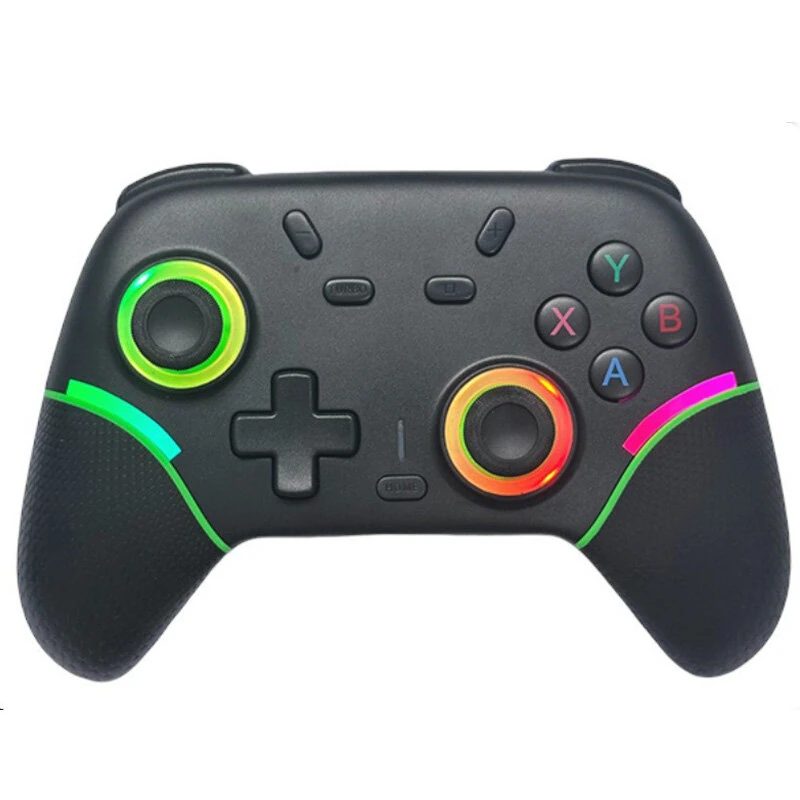
The X9 Tri-mode Wireless Gaming Controller with RGB Lighting Programmable Back Buttons Dual Vibration for PC Switch iOS Android PS3 Gamepad is a mid-range video games controller designed for gamers and content creators.
Available Offers
Free Delivery on this order. No minimum order value.
15-Day Easy Returns — hassle-free return & full refund.
Secure Payment — 100% safe checkout with UPI, Cards & Net Banking.
Price: ₹2,378
Available Offers
5% Cashback
Pay with UPI & get 5% cashback (up to ₹50) via Razorpay
No-Cost EMI
Available on select bank cards at checkout. 0% interest for 3 months.
Free Shipping
Free delivery on all orders. No minimum order value.
Cash on Delivery
COD available on orders up to ₹5,000 across India.
Ideal For
About This Product
The X9 Tri-mode Wireless Gaming Controller with RGB Lighting Programmable Back Buttons Dual Vibration for PC Switch iOS Android PS3 Gamepad is a mid-range video games controller designed for gamers and content creators. It delivers reliable performance at an accessible price.
Why Buy from Elecvora?
Elecvora sources this product directly, cutting out multiple middlemen. Every order includes free shipping, a 15-day return policy, and secure payment via Razorpay.
Specification:
Model: X9
Connection: 2.4G/Wired/bluetooth
Battery Capacity: 800mAh
Working Time: 8-10 Hours
Color: Black/White/Pink/Blue
Vibration: Asymmetric Dual-Motor Vibration
Lighting Effect: 8-bead RGB, 16 million colors
Lighting Mode: 7
Compatibility: PC, Switch, Android, iOS (Please confirm device compatibility)
Features:
1. Customizable RGB Lighting: Personalize your gaming setup with stunning 16-million-color light rings around the joysticks. Choose from 7 different dynamic lighting modes to match your style or game.
2. Programmable Back Buttons: Gain a competitive edge with two elite-grade, customizable back buttons. Easily map complex actions or combos for one-key execution and faster response.
3. Versatile Tri-Mode Connectivity: Enjoy the freedom to play on multiple platforms with bluetooth, a stable 2.4G wireless dongle, and a classic wired USB-C connection.
4. Immersive Asymmetric Vibration: Feel every impact, crash, and explosion with a sophisticated dual-motor system that provides detailed and realistic haptic feedback.
5. Ergonomic Anti-Slip Grip: The controller features uniquely curved lines and laser-textured grips, designed to provide a secure and comfortable hold for extended gaming sessions.
6. High-Capacity Battery: Equipped with an 800mAh battery, this controller supports long hours of uninterrupted gameplay, keeping you in the action longer.
Package Includes:
1 x X9 Wireless Game Controller