1 / 10 · Click to enlarge
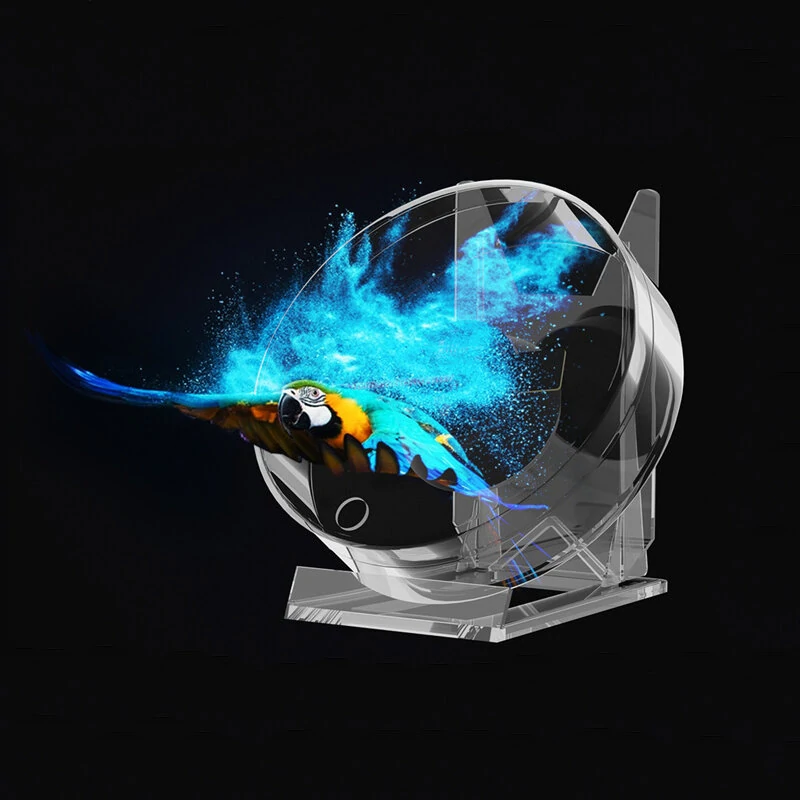
3D Fan Hologram Projector Remote Display Support Images and Video for Placing on Desks, Restaurants, Homes, Etc. to Increase the Fun
5.011 ratingsThe 3D Fan Hologram Projector Remote Display Support Images and Video for Placing on Desks, Restaurants, Homes, Etc. to Increase the Fun is a mid-range night lights designed for everyday users. Customers praise its fast and responsive and compact and portable. 100% of buyers rate it 4★ or above.
Available Offers
Free Delivery on this order. No minimum order value.
15-Day Easy Returns — hassle-free return & full refund.
Secure Payment — 100% safe checkout with UPI, Cards & Net Banking.
22% Off — you save ₹1,225 on this product!
Available Offers
5% Cashback
Pay with UPI & get 5% cashback (up to ₹50) via Razorpay
No-Cost EMI
Available on select bank cards at checkout. 0% interest for 3 months.
Free Shipping
Free delivery on all orders. No minimum order value.
Cash on Delivery
COD available on orders up to ₹5,000 across India.
Ideal For
About This Product
The 3D Fan Hologram Projector Remote Display Support Images and Video for Placing on Desks, Restaurants, Homes, Etc. to Increase the Fun is a mid-range night lights designed for everyday users. Customers highlight its fast and responsive and compact and portable.
Customer Verdict
100% of buyers rated this product 4 stars or above. The most appreciated qualities are: fast and responsive, compact and portable.
Why Buy from Elecvora?
Elecvora sources this product directly, cutting out multiple middlemen. Every order includes free shipping, a 15-day return policy, and secure payment via Razorpay.
Specification:
Imaging Size: 8.8*8.8cm
Play Music: Support
Remote Control Unit: Support
Pc/ Computer Transfer: Support
Viewing Angle: 170°
Angle Adjustment: Support
Brightness Control: Support
Support Format: MP4/AVL/MVB/JPE/PNG
Features:
1. This desktop advertising machine, with 3D holographic display technology, allows you to enjoy more vivid and interesting photos and videos anytime, anywhere.
2. Holographic naked eye imaging, stereoscopic effect restores real colours for better results.
3. With Bluetooth audio, you can play music without Bluetooth at the touch of a button on the remote control.
4. A large amount of material, support computer transfer, equipped with a multi-functional remote control simple switch material, a key to turn on the music.
5. Suitable for placing on desks, restaurants, homes, etc. to increase the fun.
Package Included:
1 x Desktop Advertising Lamp
1 x Acrylic Base
1 x Remote control
1 x Card Reader
1 x Power Cord
Note:
Light reflection and different displays may cause the color of the item in the picture a little different from the real thing. The measurement allowed error is +/- 1-3cm.